| .builds | ||
| .github/workflows | ||
| build | ||
| default-config | ||
| jay-config | ||
| qoi | ||
| src | ||
| static | ||
| wire | ||
| wire-dbus | ||
| wire-xcon | ||
| .gitignore | ||
| Cargo.lock | ||
| Cargo.toml | ||
| LICENSE | ||
| protocols.md | ||
| README.md | ||
| rustfmt.toml | ||
| todo.md | ||

Jay
Jay is a Wayland compositor written and configured in the rust programming language with hot-reload support. Jay offers improved flexibility, configurability, stability, and performance.
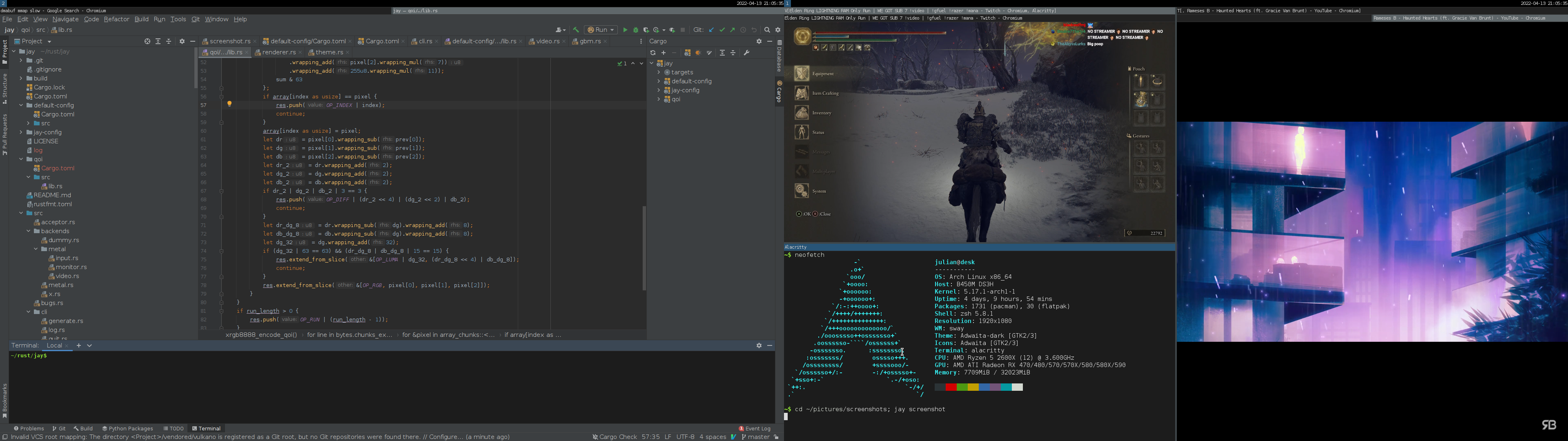
Status
Jay is in a pre-alpha state. For dedicated individuals it is possible to use Jay as their primary Wayland compositor but they have to be ready to deal with many large and small bugs and regressions. I have personally been using Jay as my daily driver for several weeks.
Currently the focus of the project is on creating an integration test suite to improve reliability and prevent regressions.
Working Features
The following features have been implemented and should work:
- Tiling windows
- Floating windows
- Fullscreen
- Multiple workspaces
- Multiple monitors
- Copy/paste including middle-click paste
- Screenshots
- Screencasting
- Keyboard shortcuts
- Theming
- Configuration reload
- XWayland
- Screensaver (paused during video playback)
- Notifications (via mako)
- Video playback with synced audio (via presentation time)
- Simple games that don't require cursor grabs
Missing Features
The following features are known to be missing or broken and will be implemented later:
- Copy/paste between X and Wayland applications
- Games that require pointer grabs
- Screen locking
- Touch and tablet support
- Efficient CPU usage:
- Damage tracking (any kind of damage causes a complete re-render currently)
- Pointer target caching (each mouse movement causes an expensive node lookup)
- GPU/monitor hotplug/unplug
- Multiple GPUs (this causes an immediate crash)
Native library dependencies
Jay is written in rust and will fetch all of its rust dependencies automatically. It is however unavoidable that Jay depends on a number of native libraries:
- libinput.so: For input event processing.
- libEGL.so, libGLESv2.so: For OpenGL rendering.
- libgbm.so: For graphics buffer allocation.
- libxkbcommon.so: For keymap handling.
- libudev.so: For device enumeration and hotplug support.
- libpangocairo-1.0.so: For text rendering.
These libraries are usually available on any Wayland-capable system.
Runtime dependencies
At runtime, Jay depends on the following services being available on the system:
- An up-to-date linux kernel and graphics drivers: Jay makes aggressive use of linux features and might not work on older systems.
- XWayland: For XWayland support.
- Pipewire: For screencasting.
- A running X server: For the X backend. (Only required if you want to run Jay as an X client.)
- Logind: For the metal backend. (Only required if you want to run Jay from a TTY.)
Building and Installing
Install the latest stable version of rustc and cargo. Follow the instructions on https://rustup.rs or use the packages provided by your distribution. Note that only the latest stable version is supported.
You can now build Jay using this command:
RUSTC_BOOTSTRAP=1 cargo build --release
The resulting binary will be located at ./target/release/jay.
Alternatively, cargo can also install the binary for you:
RUSTC_BOOTSTRAP=1 cargo install --path .
This will install the binary at $HOME/.cargo/bin/jay. If you have not already
done so, you can add $HOME/.cargo/bin to your path.
Running
You can run Jay as a freestanding compositor or as an application under X.
To start Jay as a freestanding compositor switch to a virtual terminal by
pressing CTRL-ALT-F2 (or F3, F4, ...) and run
jay run
To start Jay as an X application, execute the same command from a terminal emulator under X.
Before running Jay as a freestanding compositor, you might want to familiarize
yourself with the default keyboard shortcuts. In particular, you
can quit Jay by typing ALT-q.
Configuration
Jay is configured using a shared library. A good starting point for your own configuration is the default config crate.
- Copy this crate to a new directory.
- In
Cargo.toml- Update the path dependency to point to the correct directory.
- Change the name of the crate to
my-jay-config.
- Make a useful change to
lib.rs. - Build the crate with
cargo build. - Move
target/debug/libmy_jay_config.soto$HOME/.config/jay/config.so.
CAUTION: A common mistake is to use cp to copy the shared library to the
config location. By default, cp will overwrite the file instead of replacing
it with a new file. If you do this at runtime, jay will almost certainly
crash. Instead use mv to move the file or first delete the old file before
using cp.
When you start Jay, you will be able to make use of your useful change. At
runtime you can repeat steps 3 to 5 and reload the configuration. By default,
the shortcut to reload the configuration is ALT-r.
If you want to see a more elaborate configuration, take a look at my personal configuration.
License
Jay is free software licensed under the GNU General Public License v3.0.